
Tiny Tools - Still Worth Installing in 2025? Absolutely.
18 November 2025


Tiny Tools - Still Worth Installing in 2025? Absolutely.
Archilizer today announced an updatedrelease of Tiny Tools, our long-running workflow accelerator for Autodesk®Revit®, now compatible with Revit 2025 and 2026.

If you’ve been anywhere near the AEC automation world in the last few years, you’ll know the landscape has changed fast - Dynamo is growing from strength to strength, pyRevit scripts are everywhere, AI is trying to “autocomplete” half the industry, and Autodesk® Revit® itself keeps absorbing long-requested features (sheet duplication, anyone?).
So the obvious question: is Tiny Tools still worth aplace in your Revit 2025 and beyond environment?
Yes. Emphatically yes.
And here’s why.
The Pain We Still Solve - Repetitive Sheet Production
The everyday grind remains the same:
You need 20 GA plans for a client package, a fullset of wall-type scoping drawings, or a stack of views renamed, aligned,duplicated, bulk-edited, and then laid out neatly on sheets.
That’s still hours of clicking and scrolling.
Tiny Tools streamlines that process from hours to minutes.
The workflows haven’t gone out of style - they’ve simply become more valuable.
What Tiny Tools Actually Does (and Why People Won’t Stop Talking About It)
Tiny Tools is a compact set of highly targeted tools builtspecifically for Autodesk Revit sheet and view management:
• Align Views
Pick a “master” viewport, then align all selected viewports to it in one shot.
• Duplicate Views
Select sheets in the Project Browser → instantly duplicate every view on them.
• Duplicate Sheets
Same workflow - but for entire sheets.
(Yes, including per-sheet view duplication logic. Yes,people ask for this constantly.)
• Sheets from Views
Select multiple views → instantly generate sheets + place each view.
• Bulk Rename
Replace, batch edit, standardize, clean up naming chaos - all at once.
These tools were built with (and shaped by) dozens of architectural practices over many years, iterated, and tested in real production environments – where deadlines don’t care about your feelings.
Why It Still Matters in 2025
Because even with better automation tools in the ecosystem, nothing replaces a one-click, dead-simple workflow users can run without breaking anything.
Tiny Tools remains:
· Fast
· Predictable
· Robust in large projects
· Language-agnostic (mostly… hi Germanusers, we’re getting there)
· And free
We see firms using it to generate hundreds of sheets for masterplans, unit types, GA packages, wall types, interior elevations,feasibility packs - all without Dynamo dependencies, Python environments, or AI hallucinating a floor plan into a sandwich.
Tiny Tools keeps your sheet setup human-free, risk-free, and boring, which is exactly how sheetsetup should be.
A Quick Look
Here is a quick look at what we do:
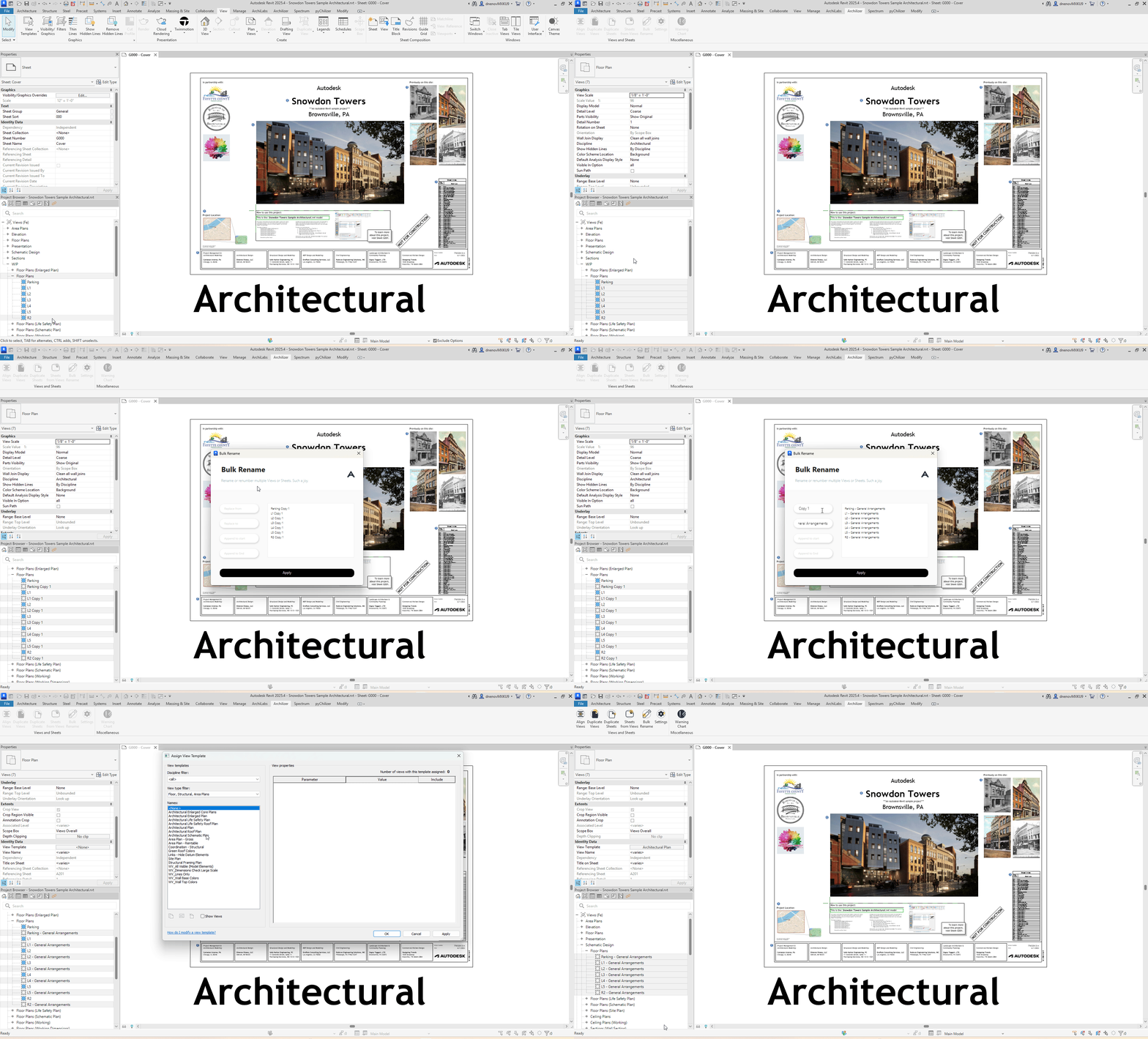
Tiny Tools – Duplicate Views
Here we show how to quickly duplicate views in bulk andrename them with equal ease.
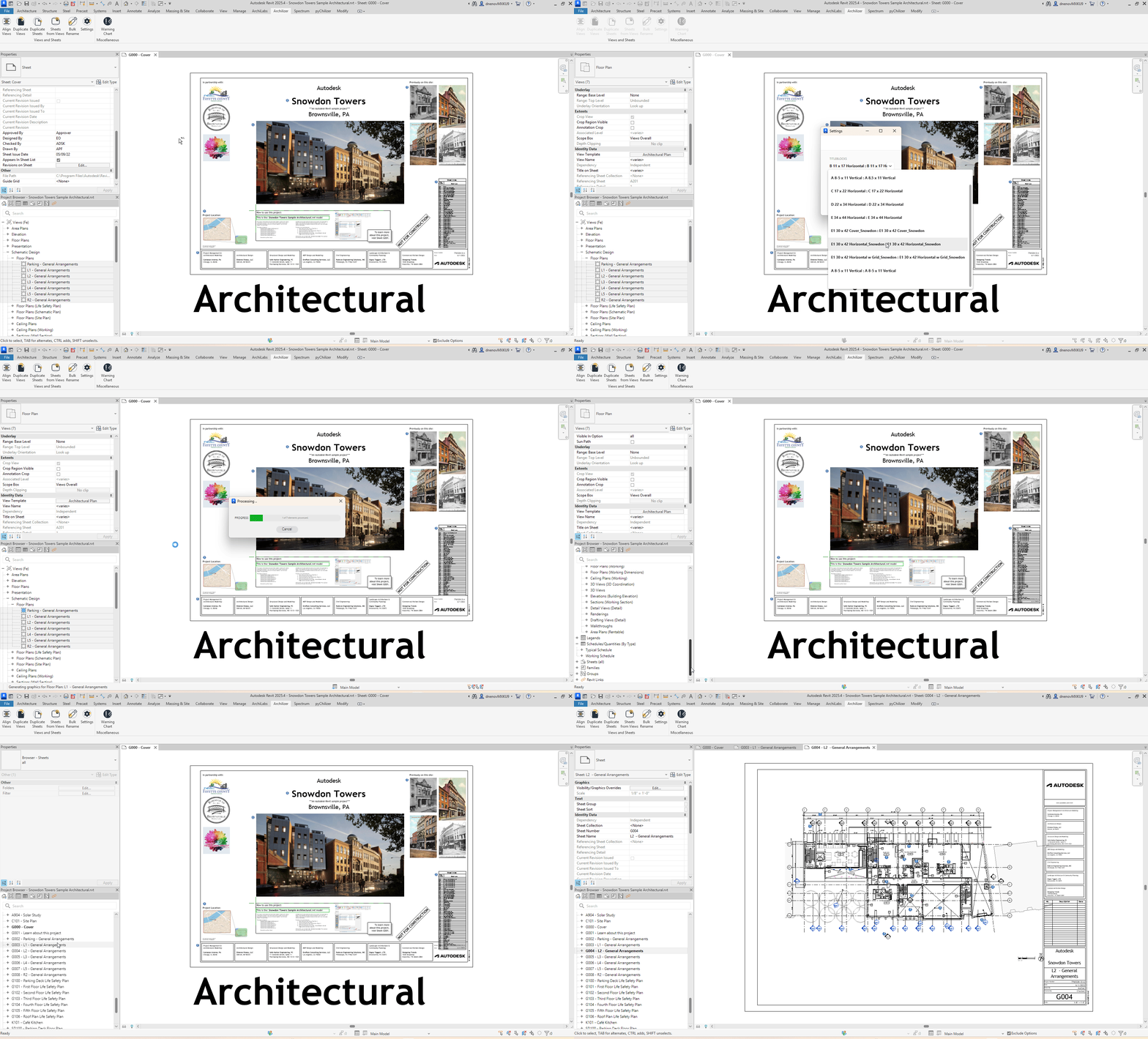
Tiny Tools – Sheets from Views
Following that, we can place the new views on Sheets – allon one go.
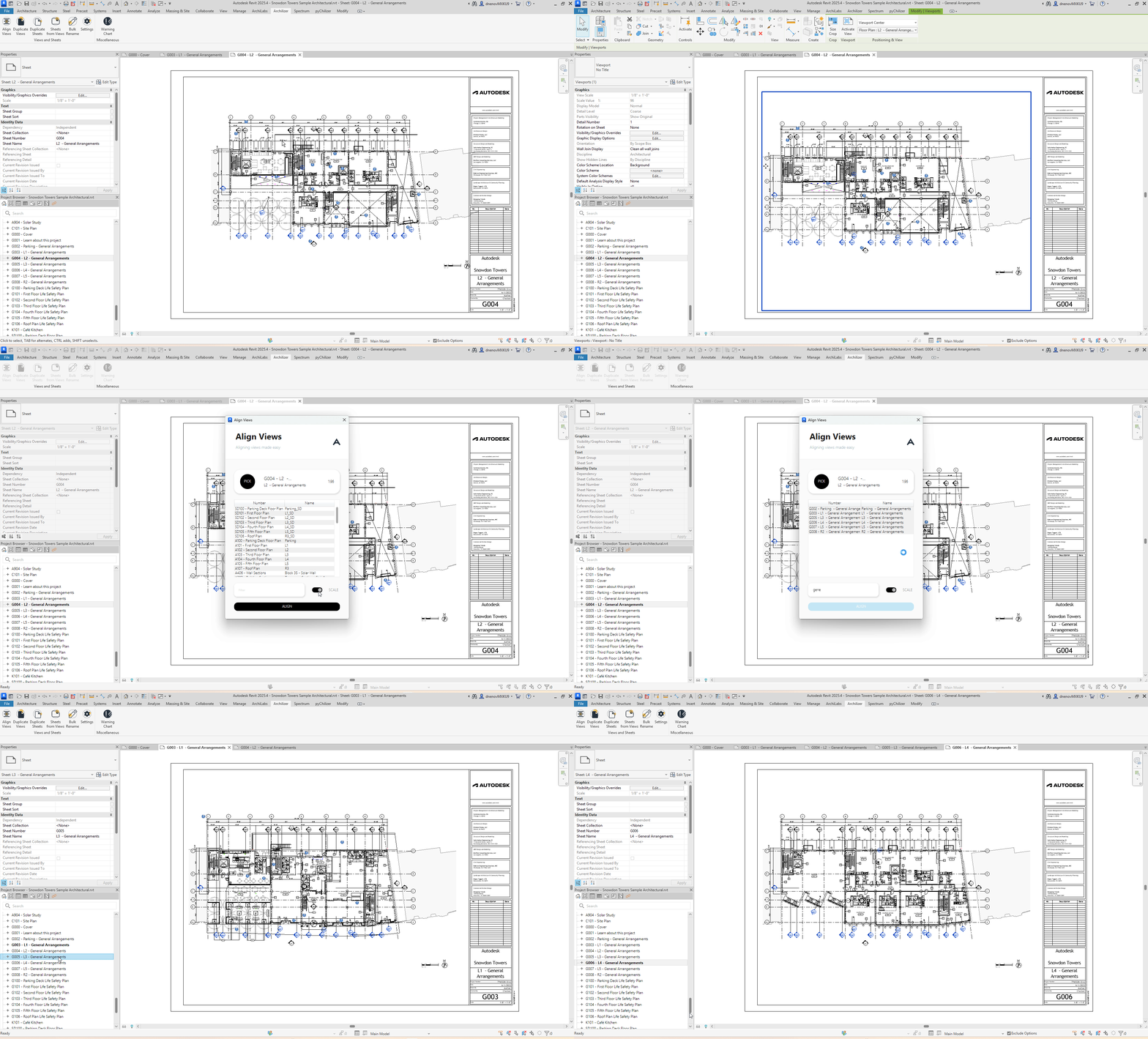
Tiny Tools – Align
If we didn’t get the positioning right – we can quicklyre-Align the views, just like that!
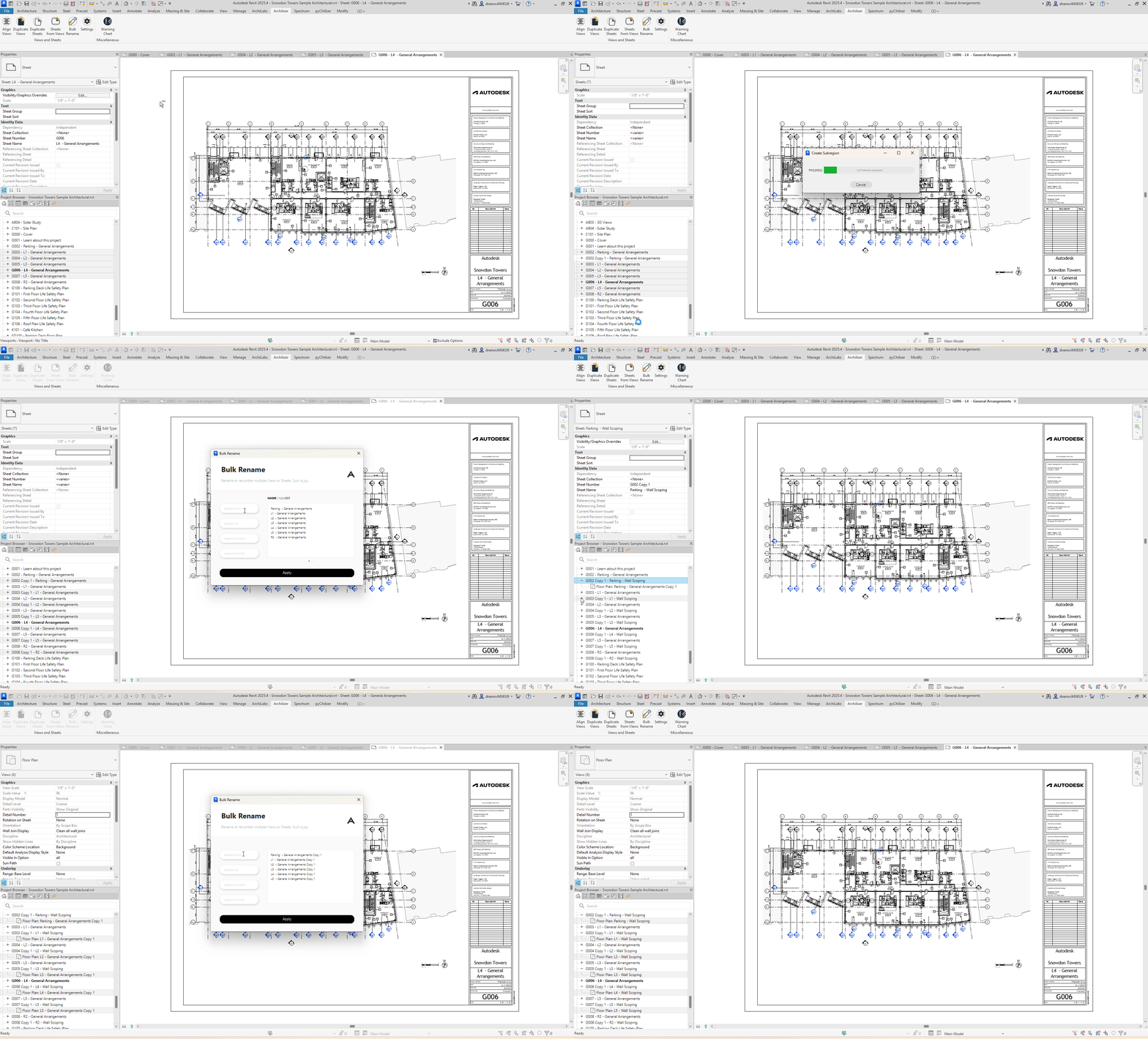
Tiny Tools – Duplicate Sheets
And finally, we can keep going with our task, duplicatingthe Sheet themselves, together (or not) with the Views!
.. and what our users say about the tool!
⭐⭐⭐⭐⭐ Small but Powerful
Tom Hutchison-Hounsell — June 04, 2024 (Verified Download)
“It only has a handful of features, but they solve someof the most time-consuming and soul-sucking tasks in Revit.
The Sheets from Views and Align Views buttons alone save hours of work onlarger projects.”
Quick Tip:
“Renumber the existing sheet to a random number before using Sheets from Views. Renumber it back afterwards - the new sheet numbers will increment from your chosen starting point.”
New for 2025–2026 - Important Installer Change
Under Autodesk’s updated security model, installation paths for Autodesk Revit add-ins from the App Store have moved from %ProgramData% to %AppData%/Autodesk/ApplicationPlugins.
This means:
· Each user installs the add-in individually
· System-context deployments (silent installs)are no longer recommended
· IT admins may need updated rollout workflows
If you’re a BIM Manager or ITadmin struggling with deployment in a locked-down environment - contact us directly.
We’re happy to walk you through the new setup and deployment options.
Tiny Tools in 2025 - The Verdict
Tiny Tools continues to be:
· One of the fastest ways to generatestructured drawing packages
· One of the cleanest view/sheet managementtoolsets on the market
· Absurdly simple to use
· Actively maintained
· And still free
Automation trends will keep shifting - but sheet production remains a slog, and Tiny Tools remains one of the most lightweight, dependable solutions for dealing with it.
If you’re using Autodesk Revit 2025 or 2026, go grabthe new version.
If you’re not using Tiny Tools yet… well, your future self will thank you.
Download Tiny Tools
You can download Tiny Tools here.
Autodesk and Revit are registered trademarks ortrademarks of Autodesk, Inc., and/or its subsidiaries and/or affiliates in theUSA and/or other countries. All other brand names, product names, or trademarksbelong to their respective holders.


